Desk setup · practical guide
A Cleaner Small Home-Office Desk: Power, Cables and One Sensible Upgrade
A simple buying guide for reducing desk cable clutter without buying a new desk, including how to choose a power strip and what to fix before adding more accessories.
A tidy desk is usually the result of fewer devices and better routing, not more organizers. Start with power placement and only then buy hardware.
The short answer
For a compact desk, a surge protector with widely spaced outlets and USB ports can remove a surprising amount of clutter. The YISHU 6 ft power strip is a practical starting point in our current catalogue, but first count your plugs and decide where the strip will live.
Our picks, with the trade-offs
These are buying recommendations, not lab-test scores. Product details and prices should be checked on the live listing before purchase.
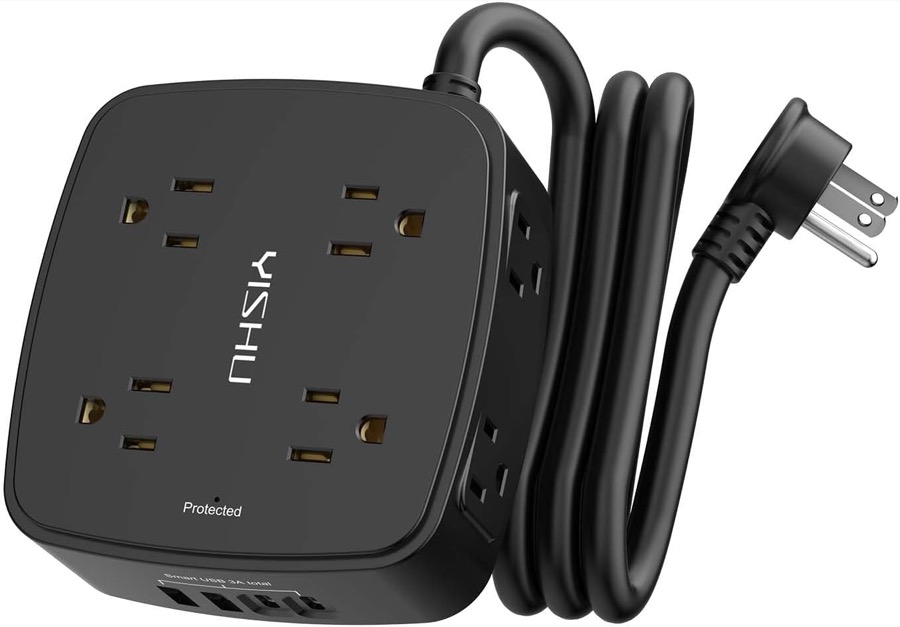
YISHU 6Ft Surge Protector Power Strip with 8 Widely Outlets & 4 USB Ports | 3 Side Outlet Extender with 6 Feet Extension Cord
Best for: Small desks with several low-power devices and a need for both standard outlets and USB charging.
Why it wins
The YISHU strip offers eight widely spaced outlets, four USB ports and a six-foot cord. The spacing matters: it lets bulky adapters share the strip instead of blocking adjacent sockets.
The trade-off
It is still a power strip, not a cable-management system. You will need a plan for routing the cord and placing the strip where it is reachable but not underfoot.
Price, rating and availability are intentionally not cached here. Confirm them on the live Amazon listing before buying.
Before you buy
Count plugs, then count again
Include the charger you forgot: monitor, laptop, lamp, phone, speaker, router or watch. A strip with enough outlets but no room for bulky adapters is still the wrong strip.
Fix the layout before buying organizers
Move the power source to the back edge of the desk, then decide which devices truly need to stay plugged in. A charger that is only used occasionally can live in a drawer. The goal is fewer cables crossing the work surface, not more boxes hiding the same clutter.
Keep liquids and loose cables away from the power strip. If the desk is shared with children or pets, place the strip where it cannot be pulled or stepped on.
Outlet spacing
Bulky adapters need room. Widely spaced outlets are often more useful than a higher outlet count in a compact strip.
Cord length
Measure from the wall outlet to the desk before choosing. An overly long cord creates its own clutter.
USB demand
USB ports reduce charger clutter, but check what each port can power. Do not assume every port supports fast charging.
Placement and safety
The strip should be reachable, ventilated and away from foot traffic. Never daisy-chain power strips.
A five-minute cable routine
Unplug everything, place the strip, then reconnect devices one at a time from least-used to most-used. Use the shortest cable that reaches. Label chargers you cannot identify, and remove any cable you have not used in the last month.
If cables still cross the desk, route them along the back edge before buying clips or trays. Hardware should solve a specific remaining problem, not substitute for deciding where things belong.
What not to buy yet
Do not start with a large under-desk cable tray if your desk has no clearance or if you move the setup often. Do not buy a USB hub solely for cable management until you know which devices need data rather than power.
Verify the power strip’s current rating and safety markings on the live product listing. Price and availability can change, and the listing should be checked before purchase.
Skip this guide if…
- — You have only one or two devices; a single wall charger may be simpler and safer.
- — You need to power high-current appliances; use a product and circuit rated for that load.
- — Your desk has no safe place for a strip; solve the room layout first.
- Product safety guidance: Use only correctly rated equipment and avoid daisy-chaining power strips.
- Amazon product listing: Current outlet layout, electrical rating, price and seller information.
- Editorial method: no paid placements; see how we choose products.
Keep comparing
Best Wireless Earbuds for iPhone in 2026: Which AirPods Actually Make Sense?
A practical comparison of AirPods 4 and AirPods Pro 3, plus two lower-cost alternatives, based on fit, noise control, battery trade-offs and iPhone features.
Robot Vacuum for Pet Hair in a Small Apartment: What Actually Helps
A realistic guide to choosing a robot vacuum for pet hair when floor space is limited, including the one model worth considering from our current catalogue and the limits no robot can solve.